
Description
Your WordPress site just became MCP-ready. WPVibe is the Model Context Protocol server for WordPress, connecting your self-hosted site to any AI assistant or AI agent that speaks MCP: Claude, ChatGPT, Cursor, Windsurf, OpenCode, and more. No copy-pasting between tabs. No switching between your AI chat and wp-admin. Tell your AI what you want, and it happens on your live WordPress site.
What People Are Saying
- “New WordPress Plugin Safely And Easily Connects AI To Your Website” (Search Engine Journal, July 2026)
- “The easiest setup of any AI product for WordPress, period. It’s so click-and-forget, and it absolutely smashes it for what you can do. It’s just mind-blowing.” (Jackson Whelan, WPTuts)
- Thousands of WordPress sites connected and over a million WordPress operations performed since launch.
The Model Context Protocol Server for WordPress
WPVibe is a complete MCP server implementation for WordPress. The Model Context Protocol, introduced by Anthropic and now adopted across the AI industry, lets AI assistants discover and call tools on connected services through a standard interface. WPVibe packages every meaningful WordPress operation (content management, media uploads, theme file browsing, REST API access, and plugin abilities) as MCP tools your AI can call.
You install this free WordPress plugin, connect your site once, and every MCP-compatible AI client becomes a WordPress co-pilot. The WPVibe WordPress MCP server handles authentication, encrypts credentials with AES-256-GCM, and relays your AI’s tool calls to the WordPress REST API. Your WordPress site, your data, your choice of AI.
Connect Claude to WordPress
WPVibe is the easiest way to connect Claude to WordPress. Use it with Claude Desktop, Claude on the web, or Claude Code in your terminal. Once connected, ask Claude to draft a blog post, schedule an article, reorganize categories, update site settings, or run any WordPress task through conversation. Claude sees your WordPress site through the MCP bridge and responds with direct action, not just suggestions.
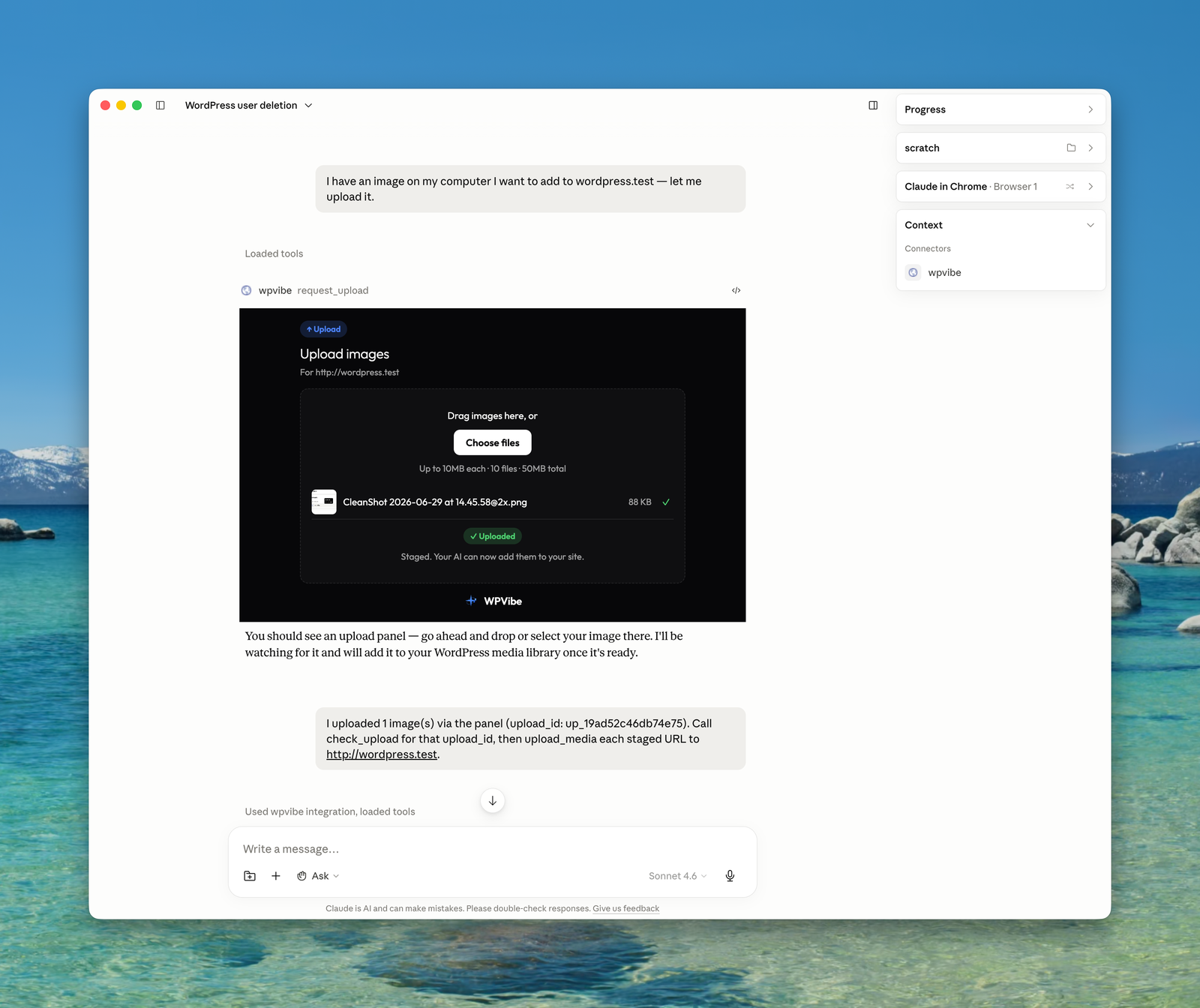
Connecting Claude to WordPress takes about 30 seconds. Install WPVibe, open the plugin admin, click to authorize, then add the MCP server URL to Claude’s connectors. From that moment, Claude can manage WordPress content, search WordPress files, upload images, and interact with any WordPress plugin that exposes the Abilities API.
Connect ChatGPT to WordPress
WPVibe is the ChatGPT WordPress plugin that actually connects the two systems instead of wrapping an API key. ChatGPT supports MCP servers directly in the web app and the desktop app, so once you add your WPVibe MCP server URL, ChatGPT can read and write to your WordPress site through ordinary conversation.
Ask ChatGPT to turn a Google Doc into a WordPress blog post, find and tag every customer who downloaded a specific resource, update your About page in your own writing voice, or bulk-publish a content calendar. ChatGPT handles the language and strategy, WPVibe handles the WordPress REST API calls behind the scenes. WPVibe is also an official connector in the ChatGPT Apps directory.
Connect Cursor, Windsurf, and Every MCP-Compatible AI Agent
WPVibe is not locked to a single AI vendor. Cursor, Windsurf, OpenCode, Claude Code, ChatGPT, Claude, and any other AI agent that supports the Model Context Protocol can connect through the same MCP server URL. One WordPress MCP server, every AI assistant, no integration rewrite when you switch tools.
For developers, this means Cursor can edit your WordPress theme files with context-aware suggestions, Claude Code can run WordPress tasks as part of an agentic workflow, and Windsurf can scaffold new WordPress templates. For content creators and agencies, this means whichever AI writes best for your brand can publish directly to your WordPress site through the WPVibe MCP bridge.
AI-Powered WordPress Content Management via MCP
Managing WordPress content through MCP has never been easier. Create blog posts, update pages, upload media, manage categories and tags, all through natural conversation with your AI assistant. Tell Claude to write a draft post about your latest product launch, ask ChatGPT to update your about page, or have Cursor reorganize your blog categories. Your AI handles the REST API calls, so you never touch wp-admin.
WPVibe works with every AI client that supports the Model Context Protocol, giving you the freedom to use Claude Desktop, ChatGPT, Cursor, Windsurf, OpenCode, or any future MCP-compatible AI tool for WordPress management.
WordPress Abilities API Support for MCP
WordPress 6.9 introduced the Abilities API, a powerful way for plugins to declare self-describing operations that AI assistants can discover and execute. WPVibe fully supports this WordPress MCP integration. Your AI can discover what abilities your installed plugins expose, inspect their input schemas, and run them directly through natural conversation.
This means AI-powered WordPress plugin management works automatically over MCP. If a plugin registers abilities (WPForms, SeedProd, and others are adopting this standard), your AI assistant can interact with it without any custom integration. The WordPress Abilities API and WPVibe together make every compatible plugin MCP-ready.
WooCommerce, Elementor, Bricks, and Your Other Plugins
WPVibe works with the plugins already running your site. For WooCommerce, your AI can review the store, manage products, and bulk-edit prices, stock, and descriptions through conversation, so updating fifty product pages no longer means fifty trips through wp-admin.
Page builders get dedicated support. Elementor, Bricks, Breakdance, Beaver Builder, and Divi pages are written through each builder’s own save pipeline, so the result opens in the builder like a hand-built page. Built-in skills cover Gutenberg, Kadence, GeneratePress (including GP Premium Elements), and SeedProd. Other plugins work through their own REST APIs or the WordPress Abilities API, and custom fields (including ACF fields, which are post meta under the hood) are read and written correctly, including on custom post types.
Safely Edit WordPress Theme Files
WPVibe lets your MCP client browse and edit your WordPress theme files safely. Your AI can list files, search file contents, analyze code structure, and make edits through a draft theme workflow. The draft clones the active WordPress theme into a sandbox, makes changes there, and exposes a preview URL so you can see the results before going live. Your live WordPress site is never touched until you explicitly approve and publish.
Every file operation runs through WordPress capability checks, a path sandbox scoped to the draft theme, and PHP syntax validation before save. You keep the safety of wp-admin’s file editing guardrails while giving your AI a real place to work.
WordPress WP-CLI Commands over MCP
Run WordPress administration commands through your MCP client. Activate plugins, switch themes, update options, flush caches, query the database, run serialized-data-aware search-replace with a dry run, and more, all via native PHP dispatch with a security-first command allowlist. Everything is emulated through PHP, so it works on shared hosting with no shell and no SSH. Your AI gets a productive WordPress admin surface without the risks of raw command execution.
Approvals You Can See, and an Audit Log
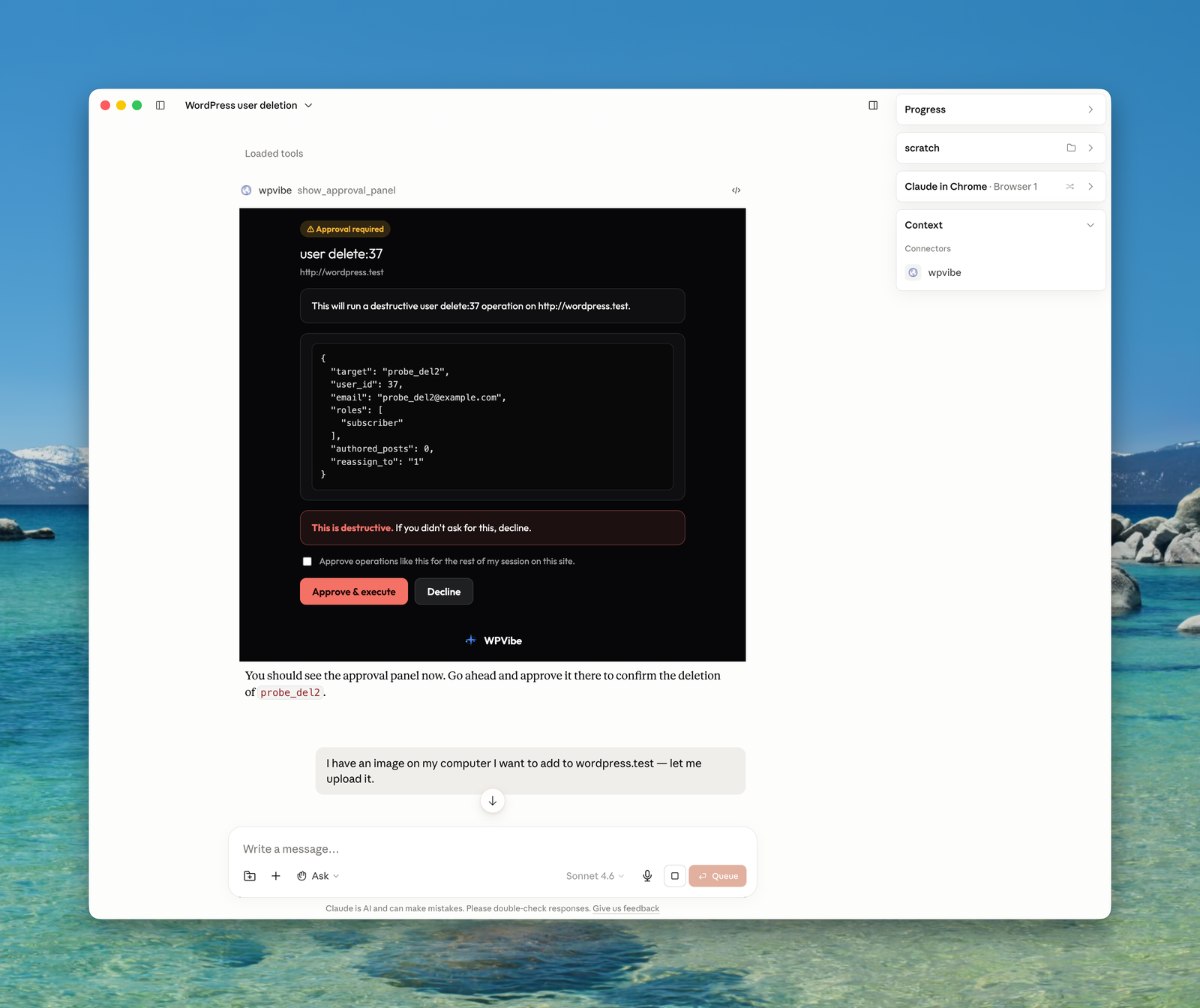
WPVibe does not open your site to the world. Access runs through WordPress’s own encrypted Application Passwords, revocable in one click. When your AI asks for something destructive (deleting a user, mutating the database, uninstalling a plugin), WPVibe pauses and shows an approval panel in the chat with the exact operation, a dry-run preview, and Approve or Decline buttons. Nothing irreversible happens without you.
Every sensitive action is recorded in an append-only Approval Log in wp-admin, with the preview you saw and the result. Posts default to draft, deletes go to trash, and theme publishing keeps a backup so you can roll back.
Smart MCP Notifications on Your WordPress Admin
Every change your AI makes over MCP triggers a smart notification in your browser with a direct link to view or edit the updated content. The notification knows whether you are in the WordPress admin or on the frontend and adapts the link, so your workflow is never disrupted while your AI works in the background.
One-Click WordPress MCP Authorization
Connecting your WordPress site to an MCP server should take seconds. No application passwords typed by hand, no API keys copied between tabs: provide your site URL, click the authorization link that appears in your WordPress admin, and approve the connection. Credentials are encrypted with AES-256-GCM and stored securely on Cloudflare-hosted WPVibe servers. One click, done.
WordPress MCP Server for Every Use Case
Whether you are a blogger, a developer building WordPress themes, or an agency managing client sites, WPVibe works through whichever MCP client you already use.
Bloggers and Content Creators write and publish posts, manage media, organize categories and tags, and update site settings through conversation with Claude, ChatGPT, or any MCP assistant.
WordPress Developers and Designers browse and edit theme files with a safe draft-preview-publish workflow, or build classic themes from scratch, directly from Cursor, Claude Code, or your favorite MCP client.
Agencies and Site Managers connect every client site and run updates across all of them from one panel, use the Abilities API to work with installed plugins, and turn on white label mode (free on every plan) so clients see a clean wp-admin while you manage the site through your AI.
Full WPVibe MCP Server Feature List
- One-click WordPress MCP server connection with AES-256 encrypted credential storage and OAuth magic-link sign-in (no passwords typed into chat)
- AI content management: posts, pages, media, categories, and tags through conversation, with surgical find-and-replace edits in posts, meta, and options
- Fleet updates: update plugins, themes, and WordPress core across every connected site from one panel, with a recheck before and a version verification after each update
- WooCommerce management: review the store and bulk-edit products, prices, stock, and descriptions
- Page builder integrations: Elementor, Bricks, Breakdance, Beaver Builder, and Divi through each builder’s own save pipeline
- Human-in-the-loop approvals with a dry-run preview, plus an append-only Approval Log in wp-admin
- Full WordPress REST API and Abilities API access as MCP tools, including custom post types and plugin routes
- WP-CLI style commands (plugins, themes, users, comments, options, database) through native PHP dispatch, no shell required
- Theme editing with a draft-preview-publish workflow, sandboxed file operations, PHP syntax validation, and a classic theme builder
- Media uploads from URLs and Unsplash stock photo search
- Works with Claude Desktop, Claude on the web, Claude Code, ChatGPT, Cursor, Windsurf, OpenCode, and any MCP-compatible AI agent
- On-demand skills that teach your AI the right approach for each WordPress task, and smart live-reload notifications in wp-admin
Third-Party Service
This plugin connects to the WPVibe service at wpvibe.ai to relay requests between your AI assistant and your WordPress site over the Model Context Protocol. When you connect your site, a WordPress application password is created and encrypted with AES-256-GCM on WPVibe servers hosted on Cloudflare. All communication between the plugin and the WPVibe MCP service occurs over HTTPS.
No data is collected, tracked, or shared with third parties beyond what is necessary to relay your AI assistant’s MCP requests to your WordPress REST API. Your content stays on your WordPress server.
On WPVibe’s own authorization page (the Approve screen an authorize link opens), if your site’s REST API answers the approval request with a firewall page or no response, the plugin reports that outcome to the WPVibe service (the HTTP status, whether the answer was a page or JSON, and the security vendor if recognised; never page content) so support can see what blocked the connection. Nothing is reported on a successful approval.
Third-Party Libraries
WPVibe bundles one third-party JavaScript library for use inside scaffolded classic starter themes:
- Alpine.js v3.15.12, MIT License, https://alpinejs.dev/, included at
starter-themes/classic/assets/js/alpine.min.js. Used as the interactivity layer (modals, dropdowns, tabs, accordions, sliders) for AI-generated classic themes. Not loaded outside scaffolded themes.
Built by SeedProd
WPVibe is built by the team behind SeedProd, the most popular WordPress landing page and theme builder plugin, trusted by over 1 million WordPress websites. We have been building WordPress tools since 2012.
Better Than Custom AI WordPress Integrations
If you have connected AI to WordPress before, you have probably dealt with custom API wrappers, hand-rolled Custom GPTs, or copying content between Claude and your browser. WPVibe replaces all of that with a proper WordPress MCP server on an open standard supported by Claude, ChatGPT, Cursor, Windsurf, and a growing list of AI tools. Connect once, use any MCP client, no custom code to maintain.
Unlike bundled-AI plugins that ship one model and one prompt style, WPVibe lets you bring your own AI and use whichever model reasons best for each task. Your content stays on your WordPress server.
Branding Guidelines
This plugin is a product of SeedProd LLC. The product name is WPVibe, one word, everywhere: the plugin, wpvibe.ai, the documentation, and the in-product UI. When writing about it, please use WPVibe rather than WPvibe, Wp Vibe, WP Vibe, or VibeAI.
WordPress MCP Server Resources
Screenshots
Installation
- Upload the
vibe-aifolder to/wp-content/plugins/ - Activate the plugin through the ‘Plugins’ menu in WordPress
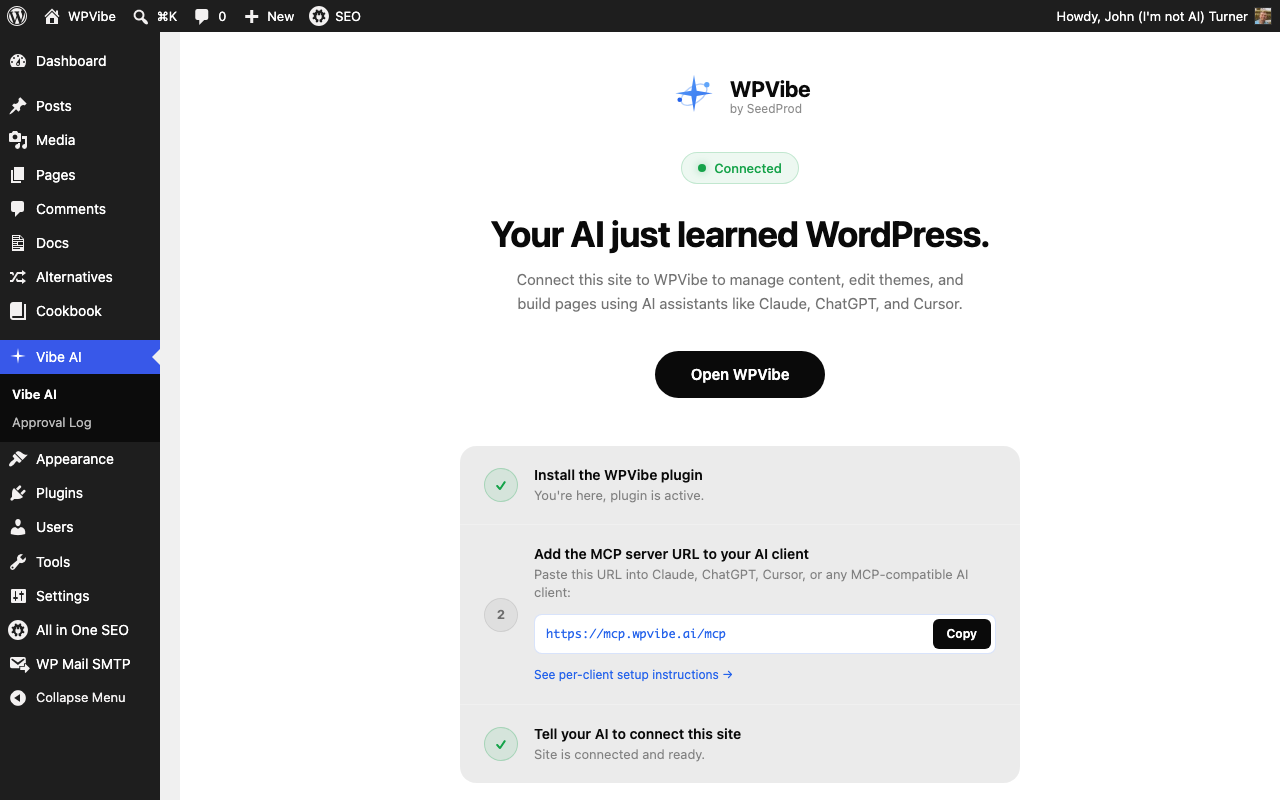
- Open the WPVibe menu in your WordPress admin and click the Connect button to view setup instructions for Claude, ChatGPT, Cursor, and other MCP clients
For detailed setup instructions, visit wpvibe.ai/docs.
FAQ
-
No, not from version 1.13.0 onward. Some servers, commonly Apache running PHP as CGI or FastCGI, do not pass the Authorization header to PHP unless CGIPassAuth is enabled. WordPress then treats every authenticated REST request as logged out. WPVibe sends the same credential under an X-WPVibe-Authorization header, which those servers do pass through, and the plugin restores it before WordPress authenticates. This mirrors what WordPress core already does in wp_populate_basic_auth_from_authorization_header(): it only runs when no credential arrived by any normal route, it validates the header format, and WordPress still checks the credential exactly as it always has, so nothing about who may do what changes.
If you would rather it did not run, add
define( 'WPVIBE_DISABLE_AUTH_FALLBACK', true );to wp-config.php, or return false from thewpvibe_allow_auth_fallbackfilter. -
Is WPVibe free? Do I need another AI subscription?
-
The plugin is free, and the WPVibe service has a free plan that includes every tool and skill with a daily allowance of WordPress actions. You bring the AI you already use: WPVibe works with the free plans of Claude and ChatGPT, and it never charges for AI inference. Optional paid plans raise your daily WordPress action allowance, which is completely separate from your Claude or ChatGPT limits.
-
Which AI assistants work with WPVibe?
-
Any AI assistant that supports the Model Context Protocol (MCP): Claude Desktop, Claude on the web, Claude Code, ChatGPT, Cursor, Windsurf, OpenCode, and any future MCP-compatible client.
-
Is WPVibe a WordPress MCP server?
-
Yes. WPVibe is a full Model Context Protocol server implementation for WordPress. Your AI client connects to the WPVibe MCP server, which relays authenticated requests to your WordPress REST API.
-
Does this plugin modify my live WordPress site directly?
-
For content management (posts, pages, media), changes go live immediately, just like editing in wp-admin. For theme editing, all changes happen in a sandboxed draft theme. The live site is never modified until you explicitly publish.
-
What authentication does WPVibe use?
-
WordPress application passwords (built into WordPress 5.6+). WPVibe uses a one-click authorization flow, so no passwords are typed into the AI chat. Credentials are encrypted with AES-256-GCM at rest.
-
Is my WordPress data sent to third-party servers?
-
No. WPVibe connects your AI assistant directly to your WordPress REST API over MCP. Your content stays on your server. The only external connection is between your AI client and the WPVibe MCP server, which proxies authenticated requests to your WordPress site.
-
Can the AI break my WordPress site?
-
WPVibe has multiple safety layers: draft theme isolation for file editing, file extension allowlists, path sandboxing, PHP syntax validation, WordPress capability checks, and WP-CLI command allowlisting. Destructive operations (mutating database queries, user deletes, plugin uninstalls, permanent deletes) pause for an in-chat approval panel with a dry-run preview before anything runs, and every approved operation is recorded in the append-only Approval Log. DELETE operations move to trash (never permanent delete), new posts default to draft status, and publishing a draft theme keeps a backup of your previous theme files so you can roll back.
-
Does WPVibe work with Elementor and other page builders?
-
Yes. WPVibe creates and edits pages in Gutenberg, Elementor, and SeedProd, with built-in skills for each, plus dedicated Elementor endpoints for pages and Elementor Pro theme builder templates. Other builders work to varying degrees through the REST API.
-
Does WPVibe work with WooCommerce?
-
Yes. Your AI can review your store and create, update, and bulk-edit WooCommerce products, prices, stock, and descriptions through conversation.
-
Does WPVibe work with ACF and custom fields?
-
Yes. Custom fields are post meta under the hood, and WPVibe reads and writes them correctly, including on custom post types where plain REST setups often fail silently. Plugins that register meta or expose the Abilities API work automatically.
-
Can I connect multiple WordPress sites?
-
Yes. Connected sites are unlimited on every plan, including the free plan. Connect all your sites to one account and switch between them in any conversation.
-
Do I need to know how to code to use WPVibe?
-
No. WPVibe lets you manage your WordPress site entirely through conversation with your AI assistant. No coding required for content management. Theme editing is also conversational, your AI writes the code for your WordPress theme.
Reviews


Contributors & Developers
“WPVibe – WordPress MCP Server. Connect Claude, ChatGPT & Any AI Agent via MCP” is open source software. The following people have contributed to this plugin.
Contributors

Interested in development?
Browse the code, check out the SVN repository, or subscribe to the development log by RSS.
Changelog
1.17.4
- Fix: the site information request no longer fails with a server error on sites where WordPress has not loaded its plugin helpers for REST requests (seen on WordPress 6.4). Approvals on those sites could not complete because WPVibe could not read the plugin version.
- Fix: when a draft theme has been activated as the live theme, the draft conflict message now says so, names both themes, and explains how to recover, instead of telling you to continue editing a draft that WPVibe will not touch.
- Improvement: the connection check message for a password gate in front of WordPress (staging protection or HTTP Basic Auth) now tells you to let the WPVibe relay IP address through the gate and links to where that address is listed.
1.17.3
- Fix: Administrator accounts can read and edit protected (underscore-prefixed) meta through content edit and content search, matching what the CLI already allowed. Keys a plugin guards with its own auth callback stay refused, with a message that names the owning plugin’s path.
- Fix: updating WPVibe from within WPVibe no longer fails with an undefined function on sites where the automatic updater runs outside wp-admin.
- Fix: a staging or cloned site no longer displays the production site’s verified connection status; saved connection observations are tied to the site address.
- Fix: saving through Bricks, Breakdance, Elementor and Beaver Builder keeps a page template the active theme no longer offers instead of resetting it to default.
- Fix: a draft theme copy that fails partway is cleaned up, and a leftover draft directory that is an unmodified partial copy is removed automatically; anything else is named so it can be removed by hand.
- Hardening: search-replace refuses to rename an option into or out of a protected name, or to a non-ASCII name. Background operation records are signed and any record not written by WPVibe on this site never runs.
1.17.2
- Fix: Signed operation approvals recover from stale per-site proof keys after updating, without reconnecting the site.
- Fix: creating a classic theme preserves existing unpublished drafts and refuses conflicting files instead of replacing them.
- Fix: interrupted draft creation cannot overwrite leftover draft files on retry. Failed deletion retains the draft record for recovery.
- Fix: publishing a new classic theme keeps its name and accurately reports whether a previous theme was backed up. Apostrophes in new theme names no longer break generated PHP.
- Hardening: draft creation, editing, publishing and deletion coordinate their file changes. Unsafe paths and drafts manually activated as the live theme are refused.
- Hardening: authenticated safety checks let WPVibe verify draft-preservation support before enabling new classic-theme creation.
1.17.1
- Fix: saving Elementor data into an existing draft page or template no longer publishes it. The post keeps its status unless you ask for a change.
- Fix: Allow for WPVibe now applies to the Approve click itself. Sites where a security plugin turns off Application Passwords passed the connectivity check but still refused the approval; both now agree.
- Fix: WP-CLI commands that spell an apostrophe inside a single-quoted value the POSIX way (closing quote, backslash apostrophe, reopening quote) now reach the handler byte for byte, and post meta values keep their backslashes. Shortcode values written that way lost their quotes. Two backslashes outside quotes now collapse to one, as in a shell.
- Security: the background-run and self-update hand-off records can no longer be written with option add, option update, option patch, or raw SQL sent by an AI, so a seeded record cannot start a run through the public loopback route. Reading them for status still works.
- Fix: editing a page whose saved template no longer exists (theme switched, builder canvas template with the builder off) failed with “Invalid page template” and a misleading crash hint. Content edits and post updates now leave the stored template alone.
- Security: wp-content diagnostic reads redact the connection proof key and bare 64-character hex secrets that a failed database write can leave in debug.log.
- Hardening: the Allow for WPVibe setting can no longer be changed through WP-CLI commands sent by an AI; only the button on the WPVibe page changes it.
1.17.0
- New: Four-step setup page. Add WPVibe to your AI, connect the site with one prompt, and confirm with a read. Steps turn green on their own as WordPress approves and your AI reads the site.
- New: Check site connectivity tests the site from inside and out before you open your AI: HTTPS, Application Passwords, a staging password gate or REST-blocking plugin, a maintenance page answering the API, a host that strips the Authorization header, and WPVibe reaching the site. Failures name the cause and the fix; the report carries the exact Cloudflare rule when a firewall is challenging WPVibe.
- New: Allow for WPVibe permits Application Passwords for WPVibe requests only when a security plugin turns them off site-wide.
- New: A signed confirmation when your AI completes its first read, plus a copyable report for support.
- New: Administrators can read wp-content files for diagnostics (read-only, secrets redacted, audited); wp-content writes remain blocked.
- New: The dashboard widget shows the same connection status as the setup page, with a Check connection link.
- New: The setup page says when the site address is http:// and WPVibe needs https://, and links to Security and the DPA in the footer.
- Change: Sites already connected read as connected from their recent activity after updating. Nothing to redo.
- Fix: The approval page explains when this WordPress account cannot create Application Passwords, or has them disabled, instead of a generic error.
- Fix: Check site connectivity runs when wp-admin is open at a different address than the site URL, such as with or without www.
- Fix: live reload polling is bounded with timeout and backoff and stops after repeated failures instead of polling forever.
- Hardening: reconnecting keeps the existing Application Password until the replacement verifies; the browser-approved credential can seed the proof key only once.
- Fix: proof key provisioning, reset and rotation work on SQLite-backed sites (WordPress Studio, Playground, the SQLite integration plugin).
1.16.5
- Fix: publishing Tailwind themes now collects source files in one request, reducing host rate-limit errors on themes with many templates.
- Hardening: publishing stops if source files cannot be collected completely or if the draft changes during preparation, preventing incomplete or stale compiled styles from going live.
1.16.4
- Fix: approved long-running commands (a live
search-replace, mutatingdb query) no longer depend on WP-Cron to run in the background. On some hosts WP-Cron never fires, so from 1.16.0 to 1.16.3 those commands could sit for 30 minutes and then report an unknown outcome without ever running. The request now answers immediately and keeps running the command in the same PHP process after releasing the connection (PHP-FPM and LiteSpeed); where PHP cannot release a connection early, the site hands the job to itself over a one-time token, and where it cannot reach itself either, the command simply runs inline. Jobs that an earlier version left queued for WP-Cron are expired if that cron ever fires, never run late. - Fix: a fatal error during a background run (memory, an engine time limit that could not be lifted) is now recorded in the operation receipt instead of leaving it open.
- Fix:
plugin update vibe-ai(WPVibe updating itself) uses the same hand-off and no longer depends on WP-Cron either.
1.16.3
- Fix: sites on XSERVER with the WAF “Command” rule enabled can connect again. That rule blocks any URL containing “ping”, which was the name of the route WPVibe checks before connecting. The check now also answers at /wpvibe/v1/health, and the plugin’s own self-update loopback moved off that word too. The /ping route stays for older connections.
1.16.2
- Fix: on sites that lock the file editor (DISALLOW_FILE_EDIT or DISALLOW_FILE_MODS), the read-only theme tools work again: listing files, reading a file, previews, and page HTML. Reads come from the draft theme when one exists and otherwise from the active theme, so a site can be inspected before an edit is proposed. Writes and draft creation stay locked.
- Improvement: the reminder that deactivating or deleting WPVibe does not disconnect the site has moved off the Plugins screen and onto the WPVibe settings page, shown once the site is connected. The confirm on Deactivate stays.
- Hardening: once a site has a proof key, the routes that require one refuse a request without it instead of falling back to plain authentication, including the window between a reconnect and the first signed call.
- Hardening: after a reconnect, only the application password that reconnect created can register the next proof key, so a credential entered by hand cannot seed one.
- Hardening: the proof-key options are blocked from
option get,option update, andoption delete.
1.16.1
- Fix: uploading a file type WordPress does not allow (or an empty file) now says so, with the extension and where to allow it, instead of reporting a filesystem error that sent people checking folder permissions.
- Fix: reading a translated page’s HTML on a WPML site with language directories now returns that language’s page instead of the default one.
- Feature: the WPVibe row on the Plugins screen explains that deactivating or deleting the plugin does not disconnect the site or revoke its application password, with links to do both, and a confirm on Deactivate says the same before the plugin’s code stops running.
- Fix:
comment createnow applies WordPress’s comment filtering for authors who lack the unfiltered_html capability (non-super-admins on multisite, sites with DISALLOW_UNFILTERED_HTML), matching what core does for those users.
1.16.0
- Feature: WPVibe can now update itself through your AI assistant.
plugin update vibe-aischedules the update to run out-of-band (the same model WordPress core uses), so the connection serving the request is never the one replacing the plugin’s files. Where available, WordPress’s automatic updater runs it, with its post-update fatal check and rollback for active plugins. Progress and the outcome are recorded in a status option your AI can read back. - Feature:
plugin auto-updates enable|disable|statuscommands, matching real WP-CLI behavior, so your AI can enroll any plugin (including WPVibe) in WordPress auto-updates. Also fixes auto-update enrollment on multisite, where the setting lives in a network option. - Feature:
theme update --allwith--excludeand--dry-run, and multiple theme slugs in one command, matching the plugin update family. - Feature:
--expect-versiononplugin updateandtheme update(a WPVibe extension): the update refuses if the available version is not the one you named, closing the race where a newer release lands between review and execution. - Fix: publishing a draft theme whose functions.php fatals now rolls back to the theme the site was actually running, and only ever activates a theme that is really installed, instead of leaving the site pointed at a directory that no longer exists.
- Fix: raw SQL that writes to a protected identity table (users, usermeta, blocked options), including through a JOIN from another table, is now refused when submitted instead of after a human approves it, and the refusal names the protected table.
- Fix:
theme install --version=<version>now installs the version you asked for. The themes API ignores a version argument, so the flag was silently dropped and the latest release was installed instead; an unavailable version is refused by name. - Feature: comment moderation from your AI assistant:
comment create(replies via--comment_parent),comment approve,unapprove,spam,unspam,trash,untrash, andcomment delete. Deleting without--forcemoves comments to the trash;--forcepermanently deletes and pauses for approval.comment listgains--format=ids|count,--orderby,--order,--offset, and--comment__in. - Feature: approved long-running commands (a live
search-replace, mutatingdb query) can run in the background: the request answers immediately, a one-shot WP-Cron job (or a token-authenticated loopback when cron is disabled) runs the command as the approving user, and the outcome is recorded in the operation receipt your AI polls. No more connection timeouts on big search-replace runs. - Feature:
post listanduser listaccept--paged=<n>/--offset=<n>so large sites can be enumerated page by page; the truncation notice names the next page. - Security: the approval-only routes (
cli/run-approved,code-snippet) now verify a per-operation proof signed by WPVibe with a key provisioned per site, so an approved operation can only be executed by the approval flow that showed it to you, never by a request that merely holds the application password. Sites without a key keep working as before until WPVibe provisions one. - Fix: operation receipts now accept the fleet runner’s operation ids, so background jobs can recover the outcome of a call that timed out mid-flight instead of re-probing.
- Feature:
core updateandcore update-db. Updating WordPress core pauses for browser approval and shows the exact version change; the approval is re-verified against the site at execution, and a leftover .maintenance file is cleaned up so a failed update cannot strand the site. - Fix: when a security plugin filters WordPress core update data,
core check-updateandcore updatenow say so instead of reporting “no update available” as a certainty. - Fix: Elementor pages saved through WPVibe are verified after the save. If Elementor stored the layout empty, WPVibe writes the requested structure directly, removes the empty autosave the editor would otherwise open, and never reports success on a page that is still empty.
- Fix: a content edit whose old text differs from the stored value only by whitespace now applies when it is the one unambiguous match, and a miss says what was tried instead of a bare “not found”.
- Hardening: PHP file writes are refused when they would redeclare a function or class the running site already has, and publishing a draft theme renders the front page afterwards and rolls back to the backup on a fatal, keeping the draft for editing.
- Fix: the Approve click on the connection screen now creates the application password through WPVibe’s own route with your logged-in session, so hosts that block the core users endpoint as “user enumeration” no longer stop the one-click connect.
- Fix: when the connection check fails, the connected page now says what actually came back (a firewall page, a redirect, a server error) and what to do about it, instead of one generic message.
1.15.5
- Fix: when WordPress rejects the application password it created seconds earlier, the plugin now reports whether that user has any application passwords stored at all, plus the install facts that explain a lost one (persistent object cache, shared user tables, wp-content drop-ins). WPVibe uses this to say “your site did not keep the password” instead of blaming the host for stripping the Authorization header.
- Fix: the Approve page no longer leaves an empty red bar when the site’s REST API answers with a firewall page or nothing at all. It now says what came back (status, page vs JSON, the security vendor if recognisable), the two fixes, and where to get help, and warns before you click when the same request is already blocked. Advisory only; the Approve form is never changed. Disable with the WPVIBE_DISABLE_AUTHORIZE_NOTICE constant or the wpvibe_authorize_notice filter.
1.15.4
- Fix: sites running WPCode with Error Logging turned on no longer hit a “Class WPCode_File_Cache not found” fatal on WPVibe requests when a snippet emits a warning. WPCode only loads that class inside wp-admin, so WPVibe now loads it for its own requests. This restores code snippet creation and WP-CLI reads on affected sites.
1.15.3
- Fix: services that authenticate with WooCommerce REST API keys (TrackShip, Metorik, and similar) no longer receive a 401 Unknown username error on sites where another plugin resolves the user early in the request.
1.15.2
- Security: hardened the protections on WPVibe’s raw database access so a disguised query cannot slip past them. WPVibe already refuses to change your site’s core web addresses, touch the users table, read your site’s secret keys, or read and write files on the server, even on a command you approve. This release closes several ways a specially crafted query could hide those actions from the safety checks, such as using SQL comments or unusual spellings of a protected setting’s name.
- Fix: read-only database queries that use REPLACE() to count or inspect content (a common reporting pattern) are no longer refused by mistake.
1.15.1
- Hardening: your page builder’s site-wide settings and global presets (such as Divi’s design presets) now require your approval before any write, on every path including option writes and raw SQL, and the approval screen shows exactly which settings change. This closes a route where a bulk edit could overwrite a builder’s global styling and break its editor across the whole site.
- Hardening: a content edit that would corrupt a page’s block markup (leaving a block’s settings unreadable, so the block vanishes from the editor) is now refused before it saves.
- Hardening: WPVibe no longer creates a draft copy of a page builder parent theme (such as Divi or Avada), which would leave the builder unable to load. It points you to the correct path instead.
- Fix: when a builder value cannot be edited directly, the guidance now names a command that actually works instead of one that dead-ends.
1.15.0
- Feature: your AI assistant can now manage navigation menus with WP-CLI style commands (menu create; menu item add-custom, add-post, add-term, update, and delete; menu location assign), no raw database access needed.
- Feature: category and tag management commands (term create, term update, term delete). Deleting a term asks for your approval first and shows how many posts and child terms are affected.
- Feature: theme mod set for changing theme customizer values, and rewrite structure for permalink settings.
- Feature: user account commands (user create, user update, user set-role, user add-role, user remove-role) plus a full user meta family (get, list, add, update, delete).
- Security: user changes that grant or remove administrator level access, or change a password or email address, always require your approval first. WPVibe also refuses to demote your connected account or the last user holding the administrator role.
- Security: capability and session storage keys can never be written through user meta commands, closing off role changes that would bypass the permission system. Session hashes, application passwords, and plugin stored secrets (such as two factor seeds and API keys) are withheld from user command output.
- Hardening: passwords set through user commands are hidden from approval screens, logs, and analytics.
1.14.3
- Fix: page builder compatibility. The live-refresh script no longer loads inside Divi, Elementor, Beaver Builder, Bricks, or Breakdance editing sessions, where it could interrupt the builder while your AI assistant was making changes (fixes the “Edit with Divi” endless spinner).
- Hardening: approved plugin replacements re-verify the installed version and active state at execution, and refuse to run if the site changed after the approval was granted (for example an auto-update during the approval window).
- Fix: clearer guidance when eval and eval-file commands are blocked. The denial now points to the code snippet workflow instead of a dead-end help lookup.
- Hardening: the approval gate and the install handler now derive “is this replacing an existing plugin” from one shared check, so they can never disagree.
1.14.2
- Feature: plugin rollback.
plugin install <slug> --version=<version> --forcenow replaces an installed plugin with the exact version you name, so your AI can walk a broken update back to the last working release. Replacing an existing install pauses for browser approval and shows the version change before anything runs; if the plugin was active it stays active afterward. - Fix:
plugin installon an already-installed plugin now explains the two ways forward (update, or force-replace with a specific version) instead of failing with a raw folder error, and unsupported install flags are refused with the supported list instead of being silently ignored. - Fix: a version that does not exist on WordPress.org is refused with a clear error instead of silently installing the latest release, and replacing a single-file plugin now switches the active copy cleanly instead of leaving the old file active.
- Hardening: the force-replace approval also covers directories WordPress can no longer read as plugins (broken installs), and WPVibe refuses to replace its own files over its own connection.
1.14.1
- Improvement: approved operations now leave an execution receipt on your site. If the connection drops right after you click Approve, WPVibe can check the receipt and tell your AI exactly what happened (it ran, it was rejected, or it never arrived) instead of reporting the outcome as unknown.
- Improvement: an approved operation can never run twice. If the same approved request is ever re-sent, the site returns the recorded result of the first run instead of executing again.
1.14.0
- Feature: Bricks support. Your AI can now build and edit Bricks pages through Bricks’ own save pipeline, with the theme’s element security checks applied and page CSS regenerated on every save (external file mode included). Layouts open in the Bricks editor exactly like hand-built pages.
- Feature: Breakdance support. Your AI can now build and edit Breakdance pages, including the blank canvas template for landing pages. Saves go through Breakdance’s own data format and refresh its CSS cache, so pages render correctly on the first load and open cleanly in the Breakdance editor. Writing a layout requires Breakdance builder access, the same permission Breakdance uses for its own editor, so connect as an administrator or a role you have granted Breakdance access.
- Fix: text values written to post fields by the AI now store exactly what was sent. Words like true or false used to be converted before saving, which could silently break theme and plugin settings that expect the literal text (found with GeneratePress page layout options). Structured JSON values are unaffected.
- Fix: sites that lock the theme and plugin file editors (a common managed-hosting setting) are now reported as locked instead of “a security plugin removed your permissions”, so your AI explains the real reason and what to do about it.
- Security: saving an Elementor or Beaver Builder page as private or scheduled now requires the same publish permission WordPress requires for publishing. Previously a user who could edit but not publish could reach those states through the builder endpoints. Publishing itself was always checked.
1.13.5
- Improvement: editing page-builder content now works through the safe content-edit path. Elementor stores a page’s text inside a protected field, so surgical text edits used to fall back to direct database writes. Those edits now go through the normal content-edit tool, which also refreshes Elementor’s cached styles so the change shows on the front end right away.
- Fix: a content edit that would have broken a builder layout’s stored data is now refused before saving, with the original left untouched, instead of writing a corrupted value.
- Fix: content search and edit now match text the way it appears on the page when the database stores HTML entities. A search for “R&D” finds stored “R&D”, and ordinary spaces match non-breaking spaces, so an AI reading rendered HTML can edit the real stored value without a no-match miss.
- Security: direct database writes to protected site settings (site address, active plugins, user roles and capabilities, the users table) are now refused even after approval. These already could not be changed through the normal commands, and raw SQL can no longer be used to get around that. Everyday content edits are unaffected.
1.13.4
- Fix: draft theme preview no longer breaks on sites running a child theme. The preview pointed WordPress at the draft for both the child theme and its parent, so the parent theme’s code never loaded and the page stopped rendering partway through. The preview now keeps the parent theme in place and layers your draft on top of it, the way WordPress expects a child theme to work. The live site was never affected. Thanks to Ryan De La Uz for the detailed report.
- Improvement: the WP-CLI command layer is reorganized under the hood so new commands can ship in smaller, safer pieces. Which commands you can run and how they behave are unchanged.
1.13.3
- Fix: updating a single plugin no longer leaves it deactivated. WordPress silently deactivates a plugin before replacing its files, and the update command did not turn it back on, so a plugin that was active before an update could end up switched off without any error. Updates now use the same method as the WordPress dashboard and the WP-CLI tool, which keeps the plugin active the whole time.
- Improvement: the update result now states whether the plugin is active or inactive after the update, verified against the site rather than assumed, so your AI assistant reports the real state instead of guessing.
- Fix: an update that failed to replace the plugin files used to report success. It now reports the failure and says the installed version is unchanged.
1.13.2
- Fix: cache purge –url=… was stripped before dispatch, so a surgical purge silently became a full cache flush. The flag now reaches the purge dispatcher for cache purge and its engine aliases; bare or empty –url errors instead of over-purging. When every detected page cache refuses a URL, the command now fails and names each engine’s reason instead of claiming there was nothing to purge.
- Fix: content search now finds text regardless of quote style. WordPress displays straight quotes as curly ones, and a search for the plain version used to come back empty even though the editing route would have matched it. That mismatch sent AI assistants hunting in the wrong place or rewriting whole posts when a one-line edit was intended. Search and edit now follow the same matching rules, so anything search returns is guaranteed to work as an edit.
- Fix: search results now say when a long line was shortened. Results were silently trimmed at 400 characters, so on long paragraphs and page builder layouts an AI could be handed a shortened snippet with no way to know text was missing. Results are now centered on the matched text and clearly flagged whenever they or their surrounding context were trimmed.
- Improvement: a failed edit now shows what is actually stored nearby. When an edit misses because the text is not quite what is stored, the error includes the closest matching passages from the real content, so the retry is informed instead of a guess. When an edit matches more than one place, the error now lists those places instead of only counting them.
- Improvement: edits now report what was actually saved. WordPress filters and security plugins can quietly alter content as it is saved. After every edit the plugin re-reads the stored value and says so when the site changed what was written, so an AI never builds its next edit on a version of the content that no longer exists.
- Improvement: theme editing denials now name their real cause. On multisite networks only network super admins can edit theme files, and some security plugins remove that ability even from administrators. In both cases the old error advised reconnecting with a more privileged account, which cannot work; the error now says which situation applies and what actually helps.
Older versions
WP.org caps the changelog at 5,000 words. For the full release history back to 1.0.0, see https://wpvibe.ai/changelog/