
Description
One Page Checkout for WooCommerce is a powerful plugin designed to simplify and speed up the buying process through multiple fast checkout options. Whether it’s popup checkout, direct checkout, or a fully integrated one-page checkout, this plugin helps reduce steps, lower cart abandonment rates, and deliver a smooth, conversion – optimized shopping experience.
With additional features like product quick view popups and variation selection on shop, category, or archive pages, customers can browse and buy with ease – all without unnecessary page loads or friction. Upgrade your WooCommerce store with flexible, user-friendly single page quick checkout solutions that drive more sales.
» Buy Pro | » Demos | » More info | » Docs
😍 Key Features at a Glance:
➜ Quick and Easy Popup Checkout
➜ Direct Checkout from Shop, Category, Archive, and Product Pages
➜ One-Page / Single-Page Checkout Flow
➜ Quick View for Instant Product Preview
➜ Advanced Visual Checkout Form Editor
➜ Trusted Badges Displayed on Checkout
➜ Smooth AJAX-Powered Checkout Experience
➜ Floating Cart Drawer with Coupon, Quantity, and Remove Controls
➜ Shortcode, Gutenberg Block, and Elementor Widget Placement
➜ Cart Recovery Tracking Dashboard with Email Automation
🔥 Core Features:
Need a faster, smoother way to boost WooCommerce sales? Plugincy’s WooCommerce One Page Quick Checkout combines popup checkout, direct checkout, one-page checkout, and product quick view—all in one powerful plugin designed to simplify the buying experience and reduce cart abandonment. Take a look at the core features:
✅️ Popup Checkout:
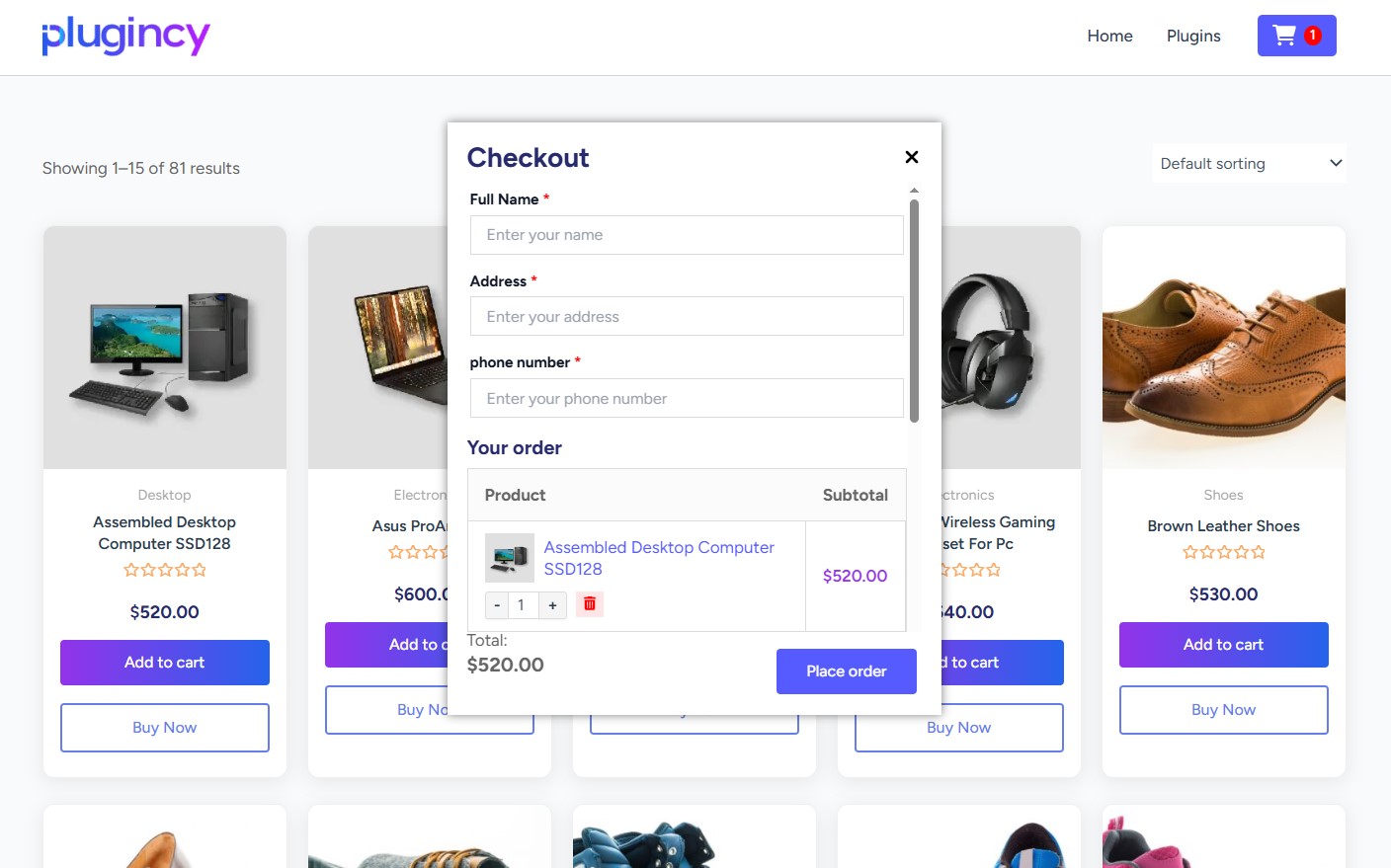
Allow your customers to complete their orders without leaving the current page.
-
Popup Checkout Form
Allows customers to complete purchases in a stylish popup window without leaving the current page, minimizing friction and boosting conversions. -
AJAX Checkout Experience
Processes cart drawer actions, add-to-cart flows, coupon updates, checkout refreshes, and related checkout interactions without unnecessary page reloads.
✅️ Direct Checkout:
Skip the cart and send buyers straight to checkout from any product – saving time and reducing drop-offs.
-
One-Click Direct Checkout
A simple way to move customers directly to checkout after clicking “Add to Cart.” -
Customizable Quick Checkout Buttons
Enable instant checkout buttons on product and archive pages (categories, tags) to speed up purchases. Customize their style and appearance to match your brand and boost the shopping experience. -
Dynamic Button Behavior Customization
Customize button actions to redirect to cart, checkout, or enable popup checkout for a smoothly purchasing experience. -
Buy Now Shortcode, Block, and Elementor Widget
Place a direct checkout button anywhere using the built-in shortcode, Gutenberg block, or Elementor widget. -
URL-Based Direct Checkout Links
Create checkout links with product, quantity, variation, and attribute parameters for simple and variable products. -
Direct Checkout Popup Option
Allows customers to complete their purchase in a popup without navigating to a separate new page. -
Variation Selection on shop/category/archive Page
Allow customers to select product variations directly from the archive page, shop page or product category – enabling instant checkout for a smooth and hassle-free purchasing experience. -
Hide “Select Option” Button for Variations
Simplify your product listings by removing the default “Select Option” button for variable products. This improves the user experience and encourages quicker purchasing decisions.
✅️ One Page / Single Page Checkout:
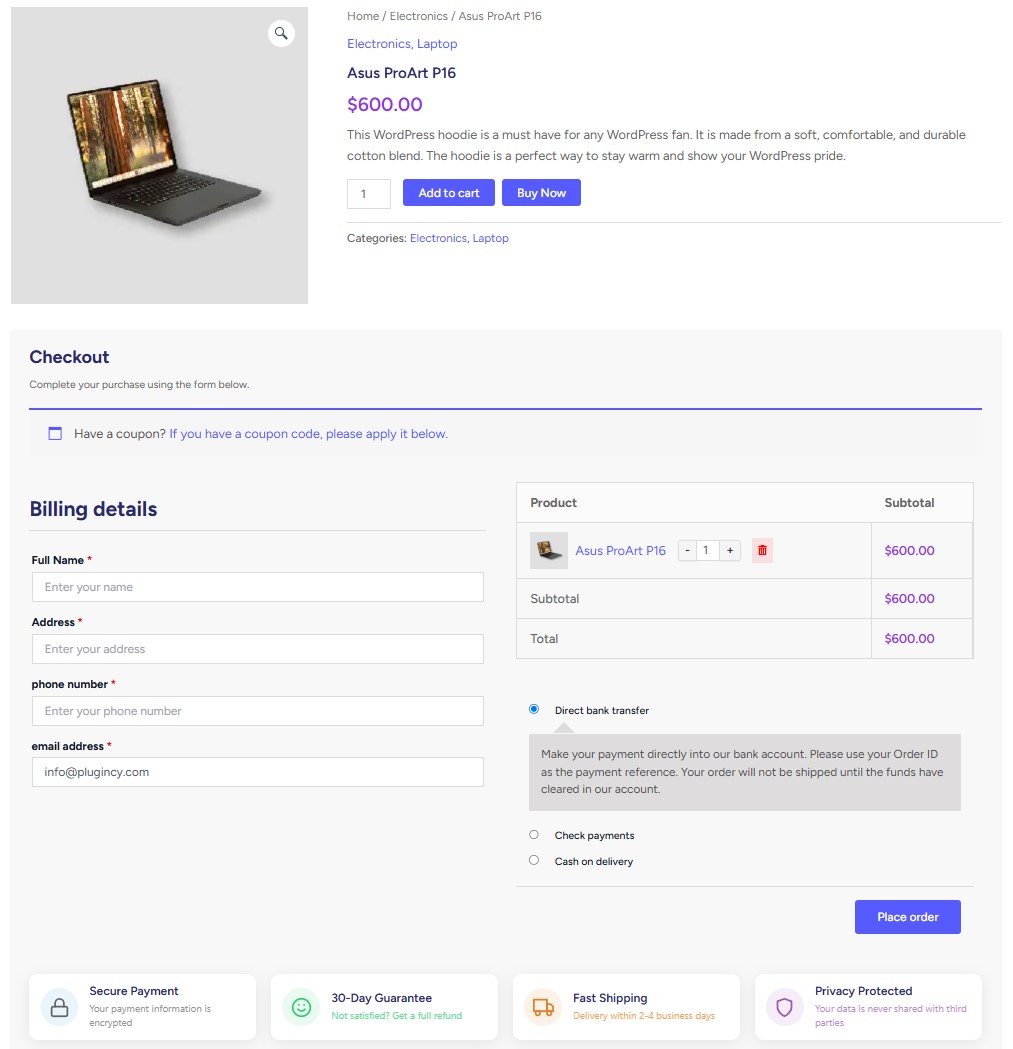
Provide customers with a complete, all-in-one checkout page – everything they need to edit, and place their order without navigating away.
-
One Page Checkout for All Products
Turn any product into a complete one-page checkout flow, allowing customers to purchase without extra steps or page transitions. -
One page Multi product checkout
Allow customers to purchase multiple products from a single page using a fast, simplified checkout process that boosts conversions. Available Layout Options:
- Product Table
- Product List
- Single Product
- Product Slider
- Product Accordion
- Tab Layout
- Pricing Table
-
Flexible Product Query Controls
Build one-page checkout layouts from product IDs, product categories, tags, or attribute terms, with a configurable product limit. -
Checkout Form Shortcode
Place a live checkout form anywhere with optional auto-add, clear-cart, quantity, product, and variation controls.
✅️ Product Quick View Popup:
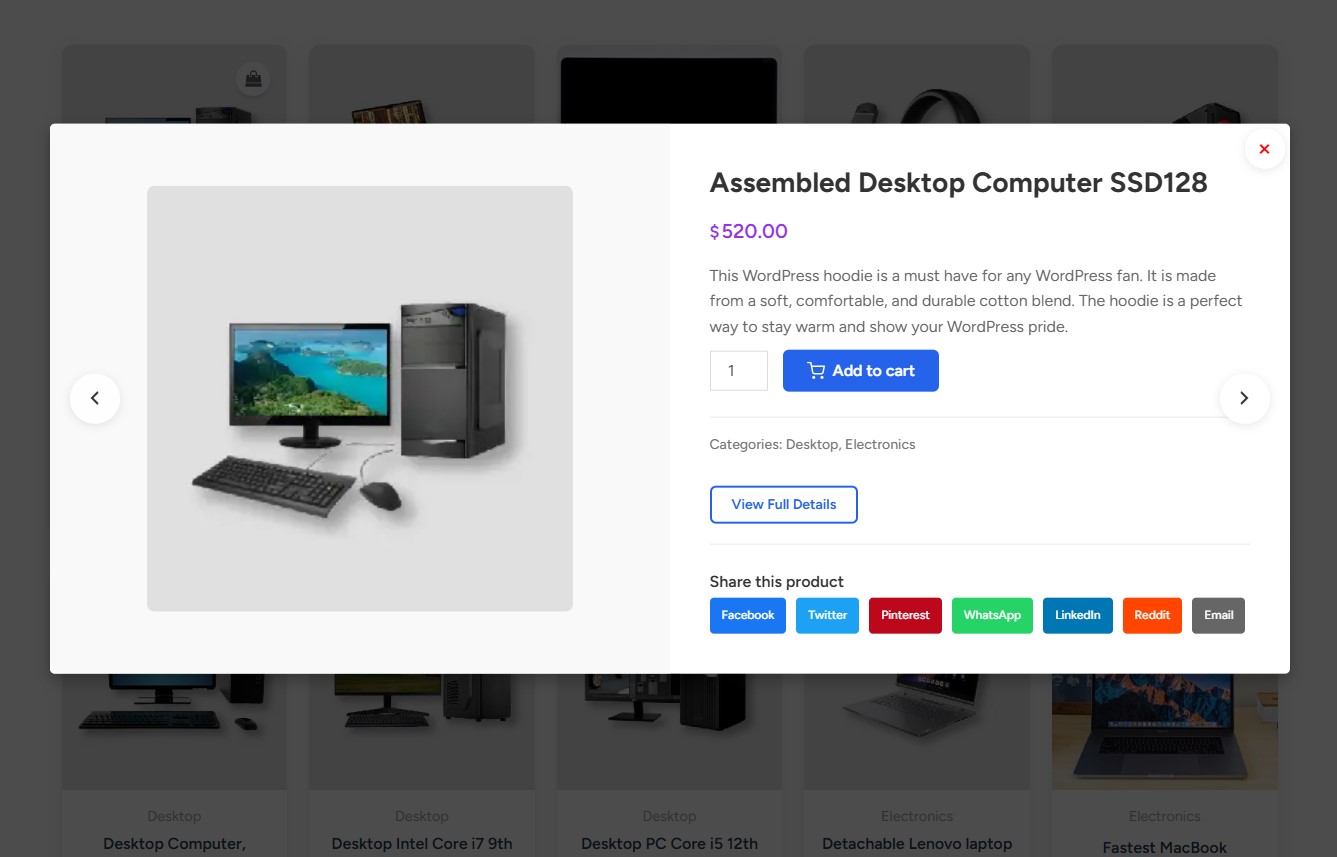
Let customers preview product details instantly in a sleek popup – no need to leave the page. Keep customers focused and speed up the process to purchase with a smooth, modern preview experience. Enhance shopping flow and boost engagement with these powerful features:
- Customizable text, icons, and button appearance
- Full control over popup content
- Product type and page targeting for shop, category, tag, brand, attribute, search, single product, featured, sale, recent, widget, and shortcode loops
- Keyboard shortcut support
- Social sharing, product attributes, and gallery view
- Mobile-optimized design
- Adjustable popup size and animation effects
- Built-in analytics to track interactions
✅️ Cart Recovery:
Track cart activity, abandoned carts, recovered carts, customer journey events, and cart recovery analytics from a dedicated admin page. Recovery email templates and automation are Pro features.
-
Cart Recovery Tracking Dashboard
Monitor cart activity, abandoned carts, recovered carts, and recovery performance from one admin area. -
Customer Journey Insights
Review useful cart events and customer journey details so you can understand where shoppers drop off. -
Recovery Email Automation
Use recovery email templates and automated recovery actions to follow up with abandoned carts.
✅️ Floating Cart / Cart Drawer:
Give customers a convenient floating cart drawer they can open while shopping, review cart contents, adjust items, and continue checkout without leaving the flow.
-
Slide-Out Floating Cart
A modern side-drawer cart that users can access from store pages for faster cart review. -
AJAX Cart Drawer Actions
Update quantities, remove items, refresh checkout totals, clear the cart, and apply or remove coupons without forcing extra page reloads. -
Shortcode, Gutenberg Block, and Elementor Placement
Place the floating cart with dedicated shortcode, Gutenberg block, and Elementor widget support. -
Advanced Floating Cart Design Controls
Customize cart icons, empty-cart behavior, drawer elements, item data, grouping, drawer text, notices, feedback text, and visual cart editor settings.
✅️ Add to Cart Controls:
Customize the add-to-cart experience across product and archive pages so customers can move from browsing to checkout with fewer steps.
-
Button Style and Label Controls
Adjust add-to-cart button text, styling, and related button behavior to match your store. -
Add-to-Cart Behavior Control
Control what happens after a customer clicks add to cart, including standard add-to-cart behavior, cart or checkout redirects, and popup checkout flows where enabled. -
Default Quantity and Success Messages
Set default quantity behavior per product and customize success messages shown after products are added to cart. -
Archive Quantity and Mobile Controls
Show quantity selectors on archive pages, use sticky add-to-cart behavior on mobile, and apply mobile-specific design adjustments.
🌟 Additional Features & Enhancements:
Take your WooCommerce checkout experience even further with these powerful tools and customizations. From editing to security options, these features add convenience, flexibility, and control across the shopping journey.
-
Advanced Layout & Form Management
Customize your checkout page with an easy-to-use editor. Show or hide fields, set them as required or optional, change labels and placeholders, and design a layout that matches your store’s design and user flow. -
Customizable Checkout Form
Easily edit field labels, placeholder text, required status, and more to customize the checkout form for your store’s needs. -
Checkout Section Visibility Controls
Hide checkout fields and sections such as coupon, shipping address, privacy text, payment options, product table, billing heading, additional details, and order review heading. -
WooCommerce Checkout Blocks Support
Apply supported checkout field labels, field removal, product links, and quantity controls across classic checkout and WooCommerce Checkout Blocks. -
Product Quantity Controls
Allow customers to adjust product quantities directly from the checkout form without navigating away. -
Remove Items Directly on Checkout
Allow users to remove products instantly from the checkout page – no need to return to the cart. -
Product Image Thumbnails
Show clear product images during checkout to improve visual confirmation and ensure accuracy. -
Linked Product Titles
Make product names clickable on the checkout page so users can easily revisit product details if needed. -
Disable WooCommerce Cart Page
Optionally bypass the default WooCommerce cart page to streamline the checkout process. -
Checkout Cache Protection
Helps prevent stale checkout output by marking checkout and popup checkout requests as no-cache for popular cache plugins. -
Trusted Badge on Checkout Form
Boost customer confidence by displaying trust badges and security seals within the checkout form. -
Login Enforcement
Add an extra layer of protection by requiring users to log in before proceeding to checkout. -
Shortcode and Page Builder Integrations
Use shortcodes with any page builder that supports WordPress shortcodes, plus dedicated Gutenberg blocks and Elementor widgets for one-page checkout, checkout form placement, buy now buttons, and the floating cart.
🎬 How to Use One Page Quick Checkout for WooCommerce
👉️ Why Use This Plugin?
Speed up checkout, reduce cart abandonment, recover lost sales, and boost conversions with one-page checkout, popup checkout, direct checkout, quick view, floating cart, add-to-cart controls, and cart recovery tools – a flexible solution for a faster, smoother WooCommerce shopping experience.
-
Faster Checkout = More Sales
Let customers complete their purchase instantly – no redirects, no slow reloads. A faster process means a lower chance of cart abandonment. -
Reduce Cart Abandonment
Direct checkout, one-click buy buttons, and popup checkout reduce drop-offs by keeping users focused through to payment. -
Recover More Abandoned Carts
Track cart activity, abandoned carts, recovered carts, customer journey events, and recovery analytics from a dedicated cart recovery dashboard. -
All-in-One Checkout Page
Turn any product into a complete one-page checkout, helping customers stay focused and convert more easily. -
Floating Cart for Faster Shopping
Let customers open a slide-out cart drawer, review products, update quantities, apply coupons, and continue checkout without leaving the shopping flow. -
Flexible Add-to-Cart Behavior
Control add-to-cart button labels, styles, default quantities, success messages, redirects, and popup checkout behavior where enabled. -
Mobile-Friendly Shopping
Optimized for smartphones with fast-loading, touch-ready checkout options and popups. -
Customizable Checkout Buttons
Match your site’s branding and add instant purchase buttons where they matter – on product, category, or tag pages. -
Supports Key WooCommerce Product Types
Works with simple, variable, and external / affiliate product flows, with additional grouped product support in relevant cart, quick view, and Pro direct-checkout paths. -
Popup Checkout with AJAX-powered
Keep customers on the same page with AJAX-powered popup checkout that doesn’t interrupt the shopping flow. -
Quick View with Instant Purchase
Let users preview and buy products in seconds using a stylish quick view popup. -
Works with Shortcodes, Builders & Themes
Use shortcodes in page builders that support WordPress shortcodes, plus dedicated Gutenberg blocks, Elementor widgets, and fallback placement hooks for modern WooCommerce themes. -
Boost Conversions Without Complex Setup
Easy to use, powerful out-of-the-box features to upgrade your store’s checkout experience with minimal effort. -
Excellent Documentation & Support
We’ve Got Your Back Every Step of the Way.
Support
For support, feature requests or bug reports, please visit Plugincy Support.
Privacy Policy
To learn more about the data we collect and how we use it, please see our Privacy Policy.
Screenshots


Blocks
This plugin provides 4 blocks.
- Buy Now Button
- Wc One Page Checkout
- Multi Product One Page Checkout
- Floating Cart
Installation
From your WordPress dashboard:
- Go to Plugins > Add New.
- Search for One Page Quick Checkout for WooCommerce.
- Click Install Now and then Activate.
Manual Installation
- Download the plugin ZIP file.
- Upload it to your WordPress site under the wp-content/plugins/ directory.
- Go to Plugins and activate One Page Quick Checkout for WooCommerce.
Recommended Requirements
- WordPress 5.3 or higher
- WooCommerce 3.6.0 or higher
- PHP 7.2 or higher
👉️ Usage:
** 1. Configure the Main Plugin Settings ** After activation, open One Page Quick Checkout in the WordPress admin and configure the features you want to use:
- Direct Checkout – enable buy now buttons, choose product/archive/single-product placement, set button text, and control checkout behavior.
- One Page Checkout – enable single-product checkout, choose the checkout layout, control add-to-cart-on-page-load behavior, and configure multi-product checkout defaults.
- Floating Cart – enable the cart drawer, choose position, style the cart button, set drawer behavior, and control cart/checkout actions.
- Quick View – enable product quick view, choose button placement, product types, page targets, popup content, AJAX add to cart, keyboard navigation, and mobile behavior.
- Add To Cart – customize Add to Cart labels, styles, AJAX add to cart, archive display, redirect-after-add behavior, and mobile controls.
- Checkout Form – manage checkout fields, headings, quantity controls, product images, linked product titles, and remove-item controls.
- Text Manage – edit storefront text used in checkout, cart drawer, buttons, notices, and related features.
** 2. Cart Recovery Usage ** Open the Cart Recovery submenu to review tracked carts, abandoned carts, recovered carts, customer journey events, and recovery analytics. Pro users can configure recovery email templates, automation, and advanced recovery actions.
** 3. Single Product One Page Checkout ** Enable one-page checkout for selected products:
- Go to Products > Edit for a product.
- In the product data panel, enable One Page Checkout.
- Update the product.
- Use the plugin’s One Page Checkout settings tab to control layout, position, auto-add behavior, and whether the normal Add to Cart button should be hidden.
You can also place a checkout form manually:
[onepaquc_checkout product_id="123" variation_id="456" qty="2" clear_cart="yes" auto_add="yes"]
Supported checkout-form attributes include product_id, variation_id, qty, clear_cart, and auto_add.
** 4. Floating Cart / Cart Drawer **
Use the settings tab to enable and style the floating cart. You can also place the cart drawer in menus, headers, templates, widgets, or page builders with:
[plugincy_cart]
Useful attributes include drawer, cart_icon, product_title_tag, position, top, and left:
[plugincy_cart drawer="right" cart_icon="cart" product_title_tag="p" position="fixed" top="80px" left="20px"]
** 5. Multi-Product One Page Checkout **
Use the One Page Checkout settings tab for defaults, or place a multi-product checkout anywhere with [plugincy_one_page_checkout].
Available templates include product-table, product-list, product-single, product-slider, product-accordion, product-tabs, and pricing-table.
Product ID examples:
[plugincy_one_page_checkout product_ids="152,153,151,142" template="product-table"]
[plugincy_one_page_checkout template="product-list" product_ids="12,15,18"]
[plugincy_one_page_checkout template="product-single" product_ids="12"]
[plugincy_one_page_checkout template="product-slider" product_ids="12,15,18,21"]
[plugincy_one_page_checkout template="product-accordion" product_ids="12,15,18"]
[plugincy_one_page_checkout template="product-tabs" product_ids="12,15,18"]
[plugincy_one_page_checkout template="pricing-table" product_ids="12,15,18"]
Category, tag, and attribute query examples:
[plugincy_one_page_checkout category="hoodies" template="product-table" limit="12"]
[plugincy_one_page_checkout tags="summer-sale" template="product-list" limit="12"]
[plugincy_one_page_checkout attribute="color" terms="blue,red" template="product-tabs" limit="12"]
Pro also supports the product-selection checkout template with product/variation labels, product images, layout, colors, spacing, and button style controls:
[plugincy_one_page_checkout product_ids="152,153,151,142" template="product-selection" position="after_description" product_label="Product" variation_label="Choose an option" updating_selection_text="Updating selection..." show_images="yes" product_layout="select_dropdown" primary_color="#4CAF50" secondary_color="#2196F3" border_radius="4" spacing="15" button_style="filled"]
** 6. Buy Now / Direct Checkout Usage **
Use the Direct Checkout settings tab to enable Buy Now buttons automatically on product and archive pages. You can also place a button manually:
[onepaquc_button]
[onepaquc_button product_id="123" variation_id="456" qty="2" text="Buy Now" icon="cart" icon_position="right"]
[onepaquc_button product_id="123" detect_variation="1" show_for="simple,variable,external,grouped"]
Supported button attributes include product_id, variation_id, detect_product, detect_variation, qty, text, icon, icon_position, class, style, and show_for.
** 7. Quick View Usage ** Enable Quick View from the Quick View settings tab. The plugin inserts the quick view button automatically on the selected WooCommerce product loops and page types.
You can configure product types, shop/category/tag/brand/attribute/search/single-product targets, button position, display type, icon, button text, popup content, AJAX add to cart, close-on-add, keyboard navigation, and mobile behavior.
** 8. Add To Cart Behavior ** Use the Add To Cart settings tab to customize WooCommerce Add to Cart behavior. The plugin supports button label changes, styling, AJAX add to cart, redirect-after-add behavior, archive quantity controls, success messages, and mobile sticky Add to Cart controls where enabled.
** 9. Checkout Form Usage ** Use the Checkout Form settings tab to control checkout field visibility, labels, required status, headings, quantity controls, remove-product controls, product image display, linked product titles, and supported WooCommerce Checkout Blocks behavior.
** 10. Gutenberg Blocks, Elementor Widgets, and Other Builders ** In the WordPress block editor, search the Plugincy block category. The plugin registers blocks for Buy Now Button, One-Page Checkout, Multi Product One Page Checkout, and Floating Cart.
In Elementor, use the Plugincy widget category for Buy Now Button, One-Page Checkout, Multi Product One Page Checkout, and Floating Cart widgets.
For Divi, Bricks, Beaver Builder, Oxygen, WPBakery, theme templates, widget areas, and other builders that support WordPress shortcodes, use the shortcode examples above.
** 11. Direct Checkout URL Links **
Create checkout links with URL parameters. The Free plugin uses the onepaquc_ prefix:
?onepaquc_add-to-cart=123&onepaquc_quantity=2
?onepaquc_add-to-cart=123&onepaquc_variation_id=456&onepaquc_quantity=1
?onepaquc_add-to-cart=123&onepaquc_variation_id=456&onepaquc_quantity=1&onepaquc_attribute_pa_color=blue
The Pro plugin uses the onepaqucpro_ prefix:
?onepaqucpro_add-to-cart=123&onepaqucpro_quantity=2
?onepaqucpro_add-to-cart=123&onepaqucpro_variation_id=456&onepaqucpro_quantity=1
?onepaqucpro_add-to-cart=123&onepaqucpro_variation_id=456&onepaqucpro_quantity=1&onepaqucpro_attribute_pa_color=blue
FAQ
-
Is this plugin compatible with most WooCommerce themes?
-
Yes, One Page Quick Checkout for WooCommerce is designed to be compatible with most WooCommerce themes. In case of styling conflicts, you can use the customization options to ensure proper display.
-
Can I customize the appearance of the checkout popup?
-
Absolutely! The plugin offers extensive customization options for colors, button text, form layout, and more through the plugin settings page.
-
Will the plugin work with variable products?
-
Yes, the plugin fully supports variable products, displaying product variations within the checkout form for customer selection.
-
Can I use this with my existing payment gateways?
-
Yes. The plugin uses WooCommerce checkout, so it works with payment gateways that render correctly in your active WooCommerce checkout.
-
Does this plugin support AJAX cart updates?
-
Yes. Cart drawer actions, add-to-cart flows, coupon updates, checkout refreshes, and quantity changes are handled with AJAX where supported.
-
Can I use this for specific products only?
-
Yes, you can specify which products use the quick checkout functionality and which follow the standard WooCommerce checkout process.
-
Yes. The plugin includes shortcodes that can work with page builders supporting WordPress shortcodes, plus Gutenberg blocks and Elementor widgets for buy now buttons, one-page checkout forms, checkout form placement, and cart drawer placement.
-
Does the plugin include cart recovery?
-
Yes. The plugin includes a Cart Recovery admin area for tracking cart activity and recovery analytics. Automated recovery emails, email templates, and advanced recovery actions are Pro features.
-
Will this work with my multi-language site?
-
The plugin is translation-ready and uses WordPress internationalization functions, so it can be translated with standard translation tools and multilingual plugins.
Reviews


Contributors & Developers
“One Page Quick Checkout for WooCommerce” is open source software. The following people have contributed to this plugin.
Contributors

Translate “One Page Quick Checkout for WooCommerce” into your language.
Interested in development?
Browse the code, check out the SVN repository, or subscribe to the development log by RSS.
Changelog
1.3.8
- Fixed: floating cart recommendation“You may also like” now renders only when valid related simple, purchasable, in-stock products exist.
- Added: Large Cart Recovery addition/refactor Cart Recovery admin submenu/page, hidden template edit page, free-mode constants, tracker/admin classes, DB schema/cron/cart tracking, locked/pro-gated email automation/actions, cart/activity/settings/admin UI, charts/modals/responsive admin JS/CSS, and minor admin/license/trust-badge class cleanup.
- Added: Version 1.3.8 plus Floating Cart Pro UI in free disabled Pro-only Floating Cart settings UI, including Floating Cart Icon, Empty Cart Icon, Hide If Cart Empty, Drawer Elements, Cart Item Data & Grouping, Drawer Text, Drawer Notices & Feedback Text, meta include/grouping builders, and the Visual Cart Editor preview UI. Also added admin CSS for the editor/preview and bumped plugin/readme/assets/license/block/docs/slider/cart-recovery schema versions to 1.3.8
1.3.7
- Fixed: an issue with the floating cart description
- Fixed: an issue in Quick View settings; follow-ups for Quick View settings, description/button position, and related “Features” work
- Added: multi language supportable
- Fixed: uncaught ReferenceError: wc_checkout_params is not defined
- Added: new pro feature “Variation Switcher in Cart & Checkout”
- Fixed: issues with External / affiliate products
- Fixed: selected-count label respects settings and is translated; more floating cart strings wired for translation
- Fixed: issues with Cart drawer “You may also like”
1.3.6
- Added: translation support for many previously hardcoded labels, headings, button texts, option labels, and tutorial text
- Fixed: admin settings toggle behavior by targeting the actual checkbox inputs more reliably
- Fixed: settings-panel enable/disable issues in One Page Checkout, Floating Cart, Direct Checkout, Quick View, AJAX Add to Cart, and Custom Add to Cart sections
- Improved: translation coverage across the admin dashboard and settings pages
1.3.5
- Fixed: variation settings disable related issue
- Fixed: quantity retrieval logic to prioritize data attributes for better accuracy in cart updates
- Fixed: refactor add to cart validation to remove unnecessary product status check
- Added: WooCommerce Blocks support for quantity controls and product links
- Improvement: quick view functionality by adding support for brand and attribute archives, and refactor page allowance checks for improved clarity and maintainability
- Improvement: cache bypass functionality for checkout requests to enhance compatibility with popular caching plugins
- Improvement: checkout field management by adding custom label support and removing required fields based on admin settings
1.3.4
- Fixed: floating cart add to cart button related issues
- Fixed: group product add to cart related issues
- Fixed: buy now button on brand & attribute archive page related issues
- Fixed: one page checkout related issues
1.3.3
- Fixed: validation added before display the variation
1.3.2.1
- Fixed: css related issue
1.3.2
- Fixed: buy now related issue
- Fixed: popup issue
- Fixed: one page checkout related issue
- Fixed: variation related issue
1.3.1
- Fixed: buy now display related issues with products shortcode & others display related issues
- Fixed: buy now redirect related issues
- Fixed: checkout layout related issues
- Fixed: payment related issues
- Fixed: variation display related issues
- Fixed: mini cart drawer hover related issues
1.3.0
- Fixed: buy now button related issues
1.2.9
- Updated: buy now button behavior
- Fixed: plugin deactivation related issue
1.2.8
- Added: separated variation selection layout
- Added: tutorial video
- Added: buy now button short code, widget, block
- Added: one page quick checkout short code, widget, block
- Fixed: icon related issues
- Fixed: buy now quantity related issues
1.2.7
- Fixed: separated variation selection issue
- Fixed: buy now & one page checkout position issue
1.2.6
- Added: place checkout form anywhere
- Fixed: buy now button with variation product for non standard theme issues
1.2.5
- Added: buy now button elementor widget, gutenburg block & shortcode
- Added: one page checkout form elementor widget, gutenburg block & shortcode
- Added: multiple layout for variation on archive page with variation title management
1.2.4
- Updated: direct checkout & add to cart button behavior
- Fixed: direct checkout & add to cart button behavior issues
1.2.3
- Updated: settings UI
- Added: more fall back hooks for non standard themes
1.2.2
- Added: fall-back hooks for non standard themes
- Fixed: quick checkout button style issues
- Fixed: quick checkout all functional issues
- Fixed: default loading effect disabled
- Fixed: quick checkout position management for archive & single page separately
1.2.1
- Added: new position added for direct checkout button
1.2.0
- Fixed: add to cart settings
1.1.9
- Fixed: redirect to checkout
1.1.8
- Fixed: product link not working
1.1.7
- Fixed: conflict with elementor
1.1.6
- Fixed: compatible with elementor and others theme
1.1.5
- Fixed: one page checkout layout
1.1.4
- Fixed: conflict with theme
1.1.3
- Fixed: auto add to cart
1.1.2
- Fixed: cart drawer checkout redirect
1.1.1
- Fixed: cart drawer open with event click
1.1.0
- Fixed: issue with popup checkout
- Fixed: cart drawer
1.0.9
- Added: floating add to cart button
1.0.8
- Fixed: issue with direct checkout
1.0.7
- Fixed: issue with checkout form manage
1.0.6
- Updated: settings UI
1.0.5
- Added: force login before checkout
- Added: toast notification on error occurred
- Added: on remove item from cart opacity down
- Added: button based on pages & product type
- Added: reset settings options
- Added: warning if text & background color same
- Fixed: issue with Add to cart redirect
- Fixed: vulnerability error
1.0.4
- Added: add to button icon default behavior updated
1.0.3
- Added: New features
1.0.2
- Added: New features
1.0.1
- Fixed: Issue with checkout
- Added new features
1.0.0
- Initial release with complete feature set including popup checkout, menu cart drawer, product templates, and AJAX checkout processing